If you have ever tried to send a stack of images to someone, but they arrived in different sizes or were just lost in a sea of attachments, you already know why Picture to PDF conversion has become one of the most searched tasks on the internet. Creating images in a single neat PDF makes everything organized, easy to share and readable everywhere. Whether you’re a student uploading scanned assignments, a freelancer sending a portfolio, or even just someone trying to make sense of a folder full of screenshots, this guide walks you through everything you need to know.
Files
Actions
Please Upload Files
Page Orientation
Very Poor
Bad
Satisfied
Good
Excellent
Help us improve
Very Poor
Bad
Satisfied
Good
Excellent
How to Use Picture to PDF Converter?
Three steps is all it takes. There is nothing to configure beforehand and nothing to install afterward.
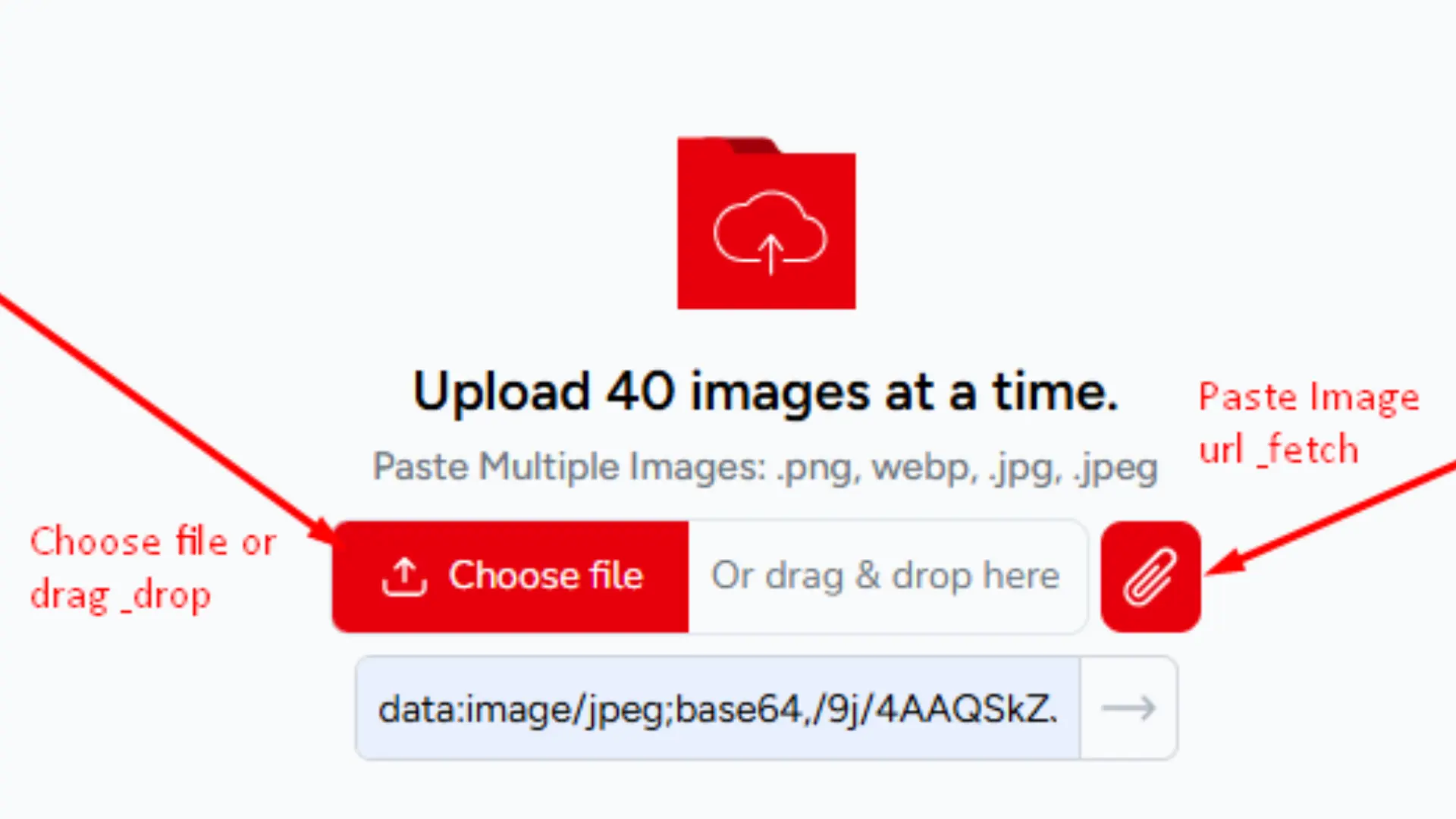
Upload Your Image:
Click the Choose File button or drag your images straight into the upload box. You can add up to 40 images at once, JPG, PNG, WEBP, HEIC, BMP, GIF, and TIFF all work. If you have images saved online or pulled from social media, paste a direct image URL, and the tool fetches it for you.
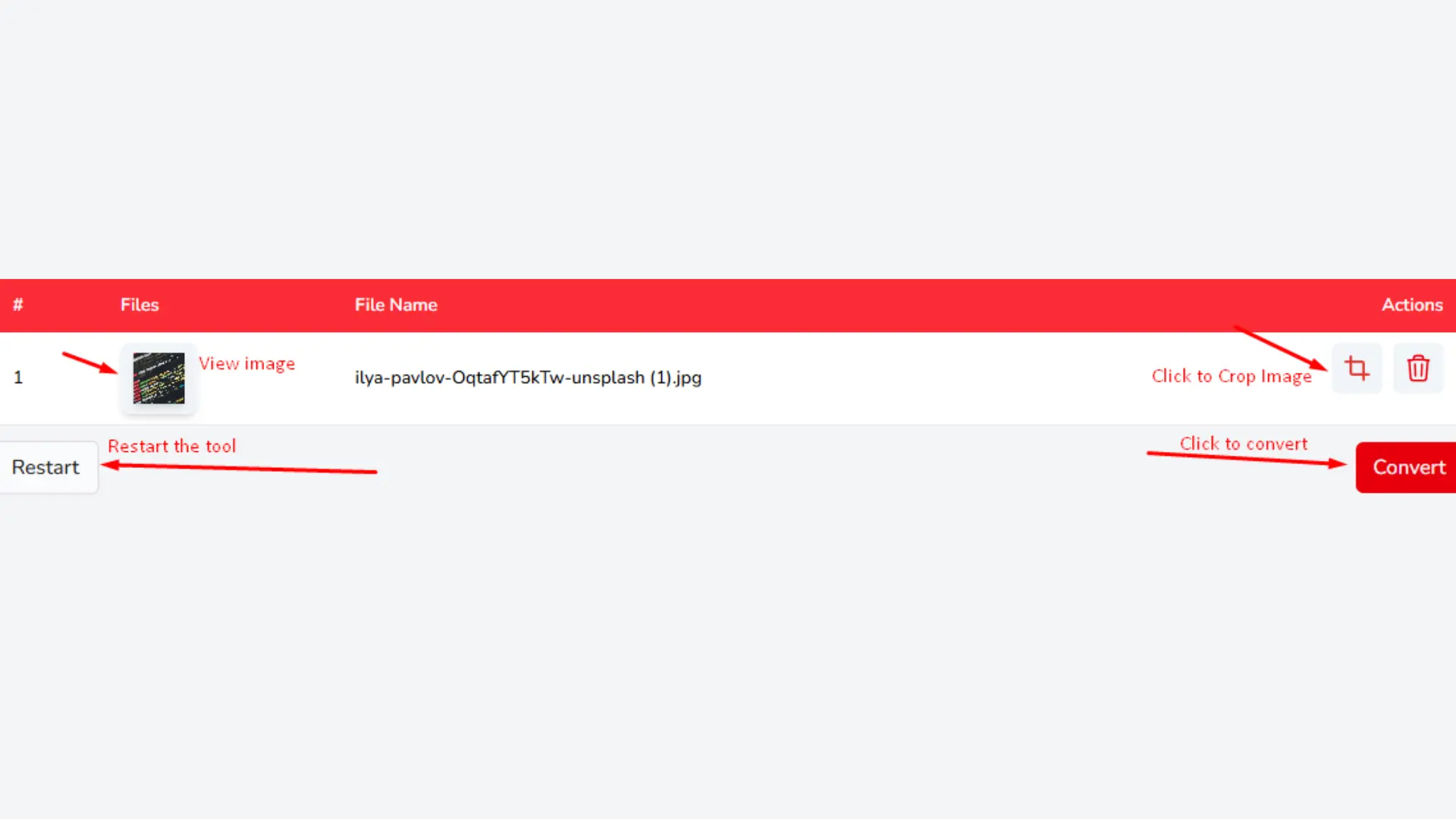
Convert to PDF:
When your images have loaded, click Convert. Processes everything on the spot, no queue, no waiting for confirmation email. Most turns less than ten seconds. You will see a page preview before the final file is ready so you can catch any order issues before you download.
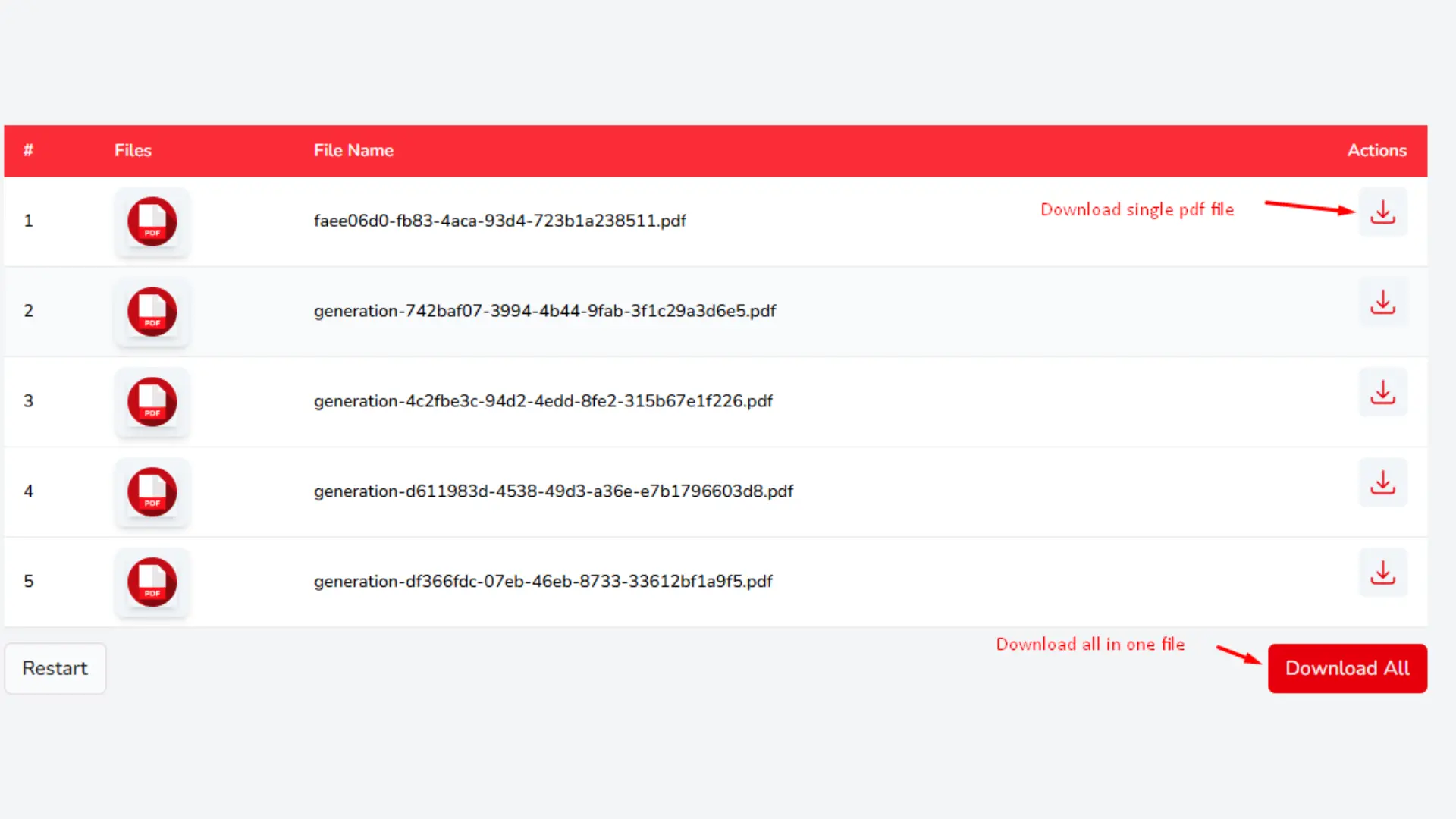
Download Your PDF:
Your converted file is ready to save the moment processing is done. Download it directly to your device with one click. The PDF is yours, no watermark, no hidden fees, no forced signup to access the file.
Key Features of Solutions Pedia Image to PDF Document Converter
Converting your image files to PDF files is what this tool is built for, and it does that one job very well. Here is what sets this picture to PDF converter free online apart from a generic conversion site.
Multiple Image Upload Options
Uploading here is not limited to one file at a time. You can select images from your local drive in bulk, drag a whole folder of files straight into the tool, or paste in an image URL to pull something directly from the web. This makes it practical whether you are converting two product photos or forty scanned receipts in one go.
Multi Images Merge in Multi Formats
The JPG to PDF converter combine capability is built in at no extra cost. Upload multiple images in different formats, JPG, PNG, GIF, TIFF, BMP & the tool merges them into a single, properly-structured PDF document. Each image lands on its own page, in the order you arranged them. No subscription, no limit on how many files you merge.
Preview Before You Convert
Before the final PDF is generated, you can review every page one by one. This is where you catch the things that are easy to miss a page that loaded upside down, an image that is out of sequence, or a file that did not upload cleanly. Fixing it here takes five seconds. Fixing it after you have sent the PDF to someone does not.
Image Cropping Before Conversion
Scanned documents almost always have unnecessary borders a bit of desk showing, the edge of the scanner lid, uneven margins. The crop tool lets you trim each image down to exactly what matters before it gets converted. The result is a cleaner PDF with consistent margins and none of the visual clutter that makes scanned docs look unprofessional.
Fast Processing and Secure Handling
Speed is not something you should have to think about when you convert image to pdf online for free. The conversion runs entirely in your browser using your own device’s processing power no files are uploaded to any server at any point. Nothing sits in a queue waiting for a remote machine. Nothing gets stored, logged, or sent anywhere. Your images stay on your device from the moment you select them to the moment you download the PDF.
Flexible PDF Download Options
Once conversion is done, you choose how the output is structured. Need everything in one document? Download a single merged PDF. Need each image as its own separate file? The tool can generate individual PDFs per image. Both options come through as clean downloads with no watermarks, regardless of how many files you are working with.
Frequently Asked Questions (FAQ'S)
Is the PNG to PDF converter tool totally free?
Yes, it is totally free. There are no subscriptions or fees, and there are no limits on the amount of images you convert.
Is it possible to convert several images into a single PDF document?
Yes, of course. You can easily convert several images into one PDF document. Just upload the images you want to merge and do the conversion.
Is there a need to sign up to get to use the converter?
No, you can just upload your images and the conversion will be done instantly.
Is my data safe?
Yes, your data is very safe. All your images are safe and your files will be deleted and will not be stored.
Can mobile devices upload images?
Absolutely! Our image to PDF converter works with computers, laptops, tablets, and smartphones. Convert your images wherever you are!
What are the types of images that will be processed?
Our converter processes all standard types of images including JPEG, GIF, PNG, TIFF, BMP, and others. You can easily convert any of those to a PDF.
Why Select Solutions Pedia?
At Solutions Pedia, we convert images to PDF that are secure and fast. It doesn't even matter if you want to convert a single image or merge multiple images into 1 PDF. You can do it fast and free, without losing quality. No hidden charges, sign up, or chargeable software. Just upload it, and you can convert it and the PDF will be ready to be downloaded. At Solutions Pedia we want to provide you the best of the best, and that goes for online document converter tools. With a user friendly interface and fast results, we want to simplify your life.